BizTalk Published Service Certificate Authentication Consume by Java Client - Part1
I had a situation where my BizTalk published wcf service is consume by non .net Framework applications like java.I have been trying to accomplish this task for last one month but could not get right answer. After regressive search I found a useful class library which can support .net applications and java with supporting NetBeans 7.0 or higher class library.
As I mentioned in the title, I will explain you how to secure your BizTalk published (schema/Orchestration) WCF Service.Here I am not keen to describe the steps to publish Schema / Orchestration as WCF Service. If you are looking for “How to publish” refer this link http://msdn.microsoft.com/en-us/library/bb226564(v=bts.70).aspx
Step:-1
First step is to download the “WCF Express Interop Bindings 1.0.zip.zip“ file and install on your development box.http://wcf.codeplex.com/releases/view/68276
Step:-2
Amend machine.config file with metroBinding.
If you are running with .net Framework 4.0 then you need to update in two machine configuration files
1. C:\Windows\Microsoft.NET\Framework\v2.0.50727\CONFIG\machine.config
2. C:\Windows\Microsoft.NET\Framework\v4.0.30319\Config\machine.config
If you are running with .net Framework 4.0 under 64bit windows then you need to update in another two machine configuration files
1. C:\Windows\Microsoft.NET\Framework64\v2.0.50727\CONFIG\ machine.config
2. C:\Windows\Microsoft.NET\Framework64\v4.0.30319\CONFIG\ machine.config
Add Binding Extensions
Name ="metroBinding" type="Microsoft.ServiceModel.Interop.Metro.Configuration.MetroBindingCollectionElement, Microsoft.ServiceModel.Interop, Version=1.0.0.0, Culture=neutral, PublicKeyToken=4fc38efee625237e"
Add Client endpoint
binding="oracleEBSBinding"
contract="IMetadataExchange"
name="oracleebs"
your machine.config should look like below
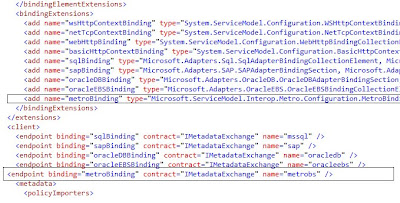
Note: Make sure you back up of each machine.config file before you update.
So far we have done the install and configure the metro binding. Now we do the actual BizTalk configuration and testing part.
Step:-3
Generate Server and Client certificate to authenticate the service for “Mutual authentication” process
Generate Server Certificate
makecert -r -pe -n "CN=BTSTestServerCertificate" -sky exchange BTSServerCert.cer -sv BTSServerCert.pvk
pvk2pfx.exe -pvk BTSServerCert.pvk -spc BTSServerCert.cer -pfx BTSServerCert.pfx
Generate Client Certificate
makecert -r -pe -n "CN=BTSTestClientCertificate" -sky exchange BTSClientCert.cer -sv BTSClientCert.pvk
pvk2pfx.exe -pvk BTSClientCert.pvk -spc BTSClientCert.cer -pfx BTSClientCert.pfx
Install Server and Client certificates (.cer) at Trusted Root Certification Authorities
Install Server and client Personal Information Exchange (.pfx) files at Personal Tab
If java client is consuming the BizTalk published service then you need to send Server and Client .pfx files to Java guys to generate .jks (Java Key store file) file
Step:-4
Create Two-Way receiveLocation for the published service ( if you have mentioned application name during le publishing Wizard open the receive location)
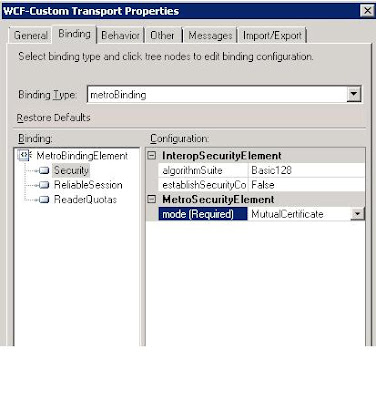
use WCF-Custom / WCF-CustomIsolated adapter and then use metrobinding to configure the Certificate authentication.
Selecting adapter and General Configuration
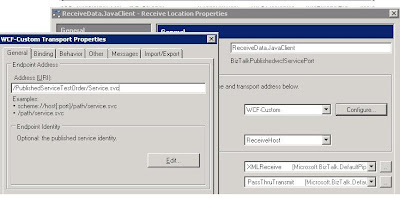
MetroBinding – General configuration
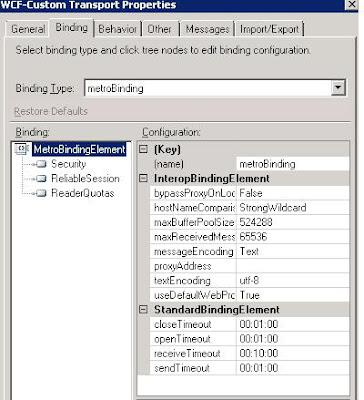
MetroBinding – Security configuration
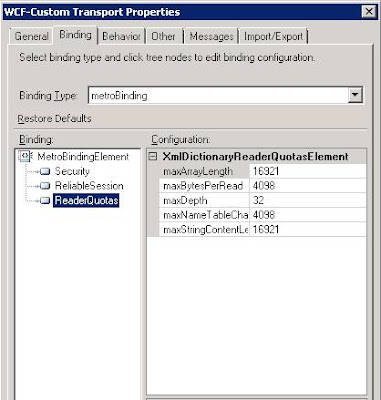
Behavior Configuration
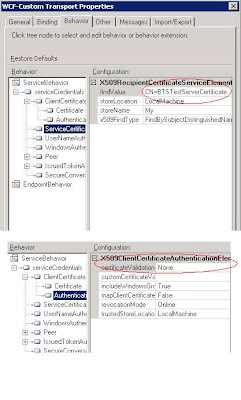
You are ready with certificate authentication for BizTalk published WCF service. You can use this service to consume .net and non .net application like Java.
I will update you on my next article for how to test using “.net client”
Continue -- Part-2
Drop a comment if this article helped you to solve your problemalso you can email me for complete solution zip file to download
you can reach me @ raj.webjunky@yahoo.com
I had a situation where my BizTalk published wcf service is consume by non .net Framework applications like java.I have been trying to accomplish this task for last one month but could not get right answer. After regressive search I found a useful class library which can support .net applications and java with supporting NetBeans 7.0 or higher class library.
As I mentioned in the title, I will explain you how to secure your BizTalk published (schema/Orchestration) WCF Service.Here I am not keen to describe the steps to publish Schema / Orchestration as WCF Service. If you are looking for “How to publish” refer this link http://msdn.microsoft.com/en-us/library/bb226564(v=bts.70).aspx
Step:-1
First step is to download the “WCF Express Interop Bindings 1.0.zip.zip“ file and install on your development box.http://wcf.codeplex.com/releases/view/68276
Step:-2
Amend machine.config file with metroBinding.
If you are running with .net Framework 4.0 then you need to update in two machine configuration files
1. C:\Windows\Microsoft.NET\Framework\v2.0.50727\CONFIG\machine.config
2. C:\Windows\Microsoft.NET\Framework\v4.0.30319\Config\machine.config
If you are running with .net Framework 4.0 under 64bit windows then you need to update in another two machine configuration files
1. C:\Windows\Microsoft.NET\Framework64\v2.0.50727\CONFIG\ machine.config
2. C:\Windows\Microsoft.NET\Framework64\v4.0.30319\CONFIG\ machine.config
Add Binding Extensions
Name ="metroBinding" type="Microsoft.ServiceModel.Interop.Metro.Configuration.MetroBindingCollectionElement, Microsoft.ServiceModel.Interop, Version=1.0.0.0, Culture=neutral, PublicKeyToken=4fc38efee625237e"
Add Client endpoint
binding="oracleEBSBinding"
contract="IMetadataExchange"
name="oracleebs"
your machine.config should look like below

Note: Make sure you back up of each machine.config file before you update.
So far we have done the install and configure the metro binding. Now we do the actual BizTalk configuration and testing part.
Step:-3
Generate Server and Client certificate to authenticate the service for “Mutual authentication” process
Generate Server Certificate
makecert -r -pe -n "CN=BTSTestServerCertificate" -sky exchange BTSServerCert.cer -sv BTSServerCert.pvk
pvk2pfx.exe -pvk BTSServerCert.pvk -spc BTSServerCert.cer -pfx BTSServerCert.pfx
Generate Client Certificate
makecert -r -pe -n "CN=BTSTestClientCertificate" -sky exchange BTSClientCert.cer -sv BTSClientCert.pvk
pvk2pfx.exe -pvk BTSClientCert.pvk -spc BTSClientCert.cer -pfx BTSClientCert.pfx
Install Server and Client certificates (.cer) at Trusted Root Certification Authorities
Install Server and client Personal Information Exchange (.pfx) files at Personal Tab
If java client is consuming the BizTalk published service then you need to send Server and Client .pfx files to Java guys to generate .jks (Java Key store file) file
Step:-4
Create Two-Way receiveLocation for the published service ( if you have mentioned application name during le publishing Wizard open the receive location)
use WCF-Custom / WCF-CustomIsolated adapter and then use metrobinding to configure the Certificate authentication.
Selecting adapter and General Configuration
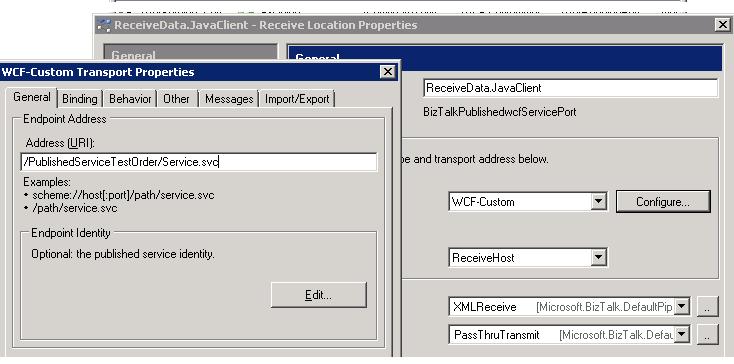
MetroBinding – General configuration

MetroBinding – Security configuration


Behavior Configuration

You are ready with certificate authentication for BizTalk published WCF service. You can use this service to consume .net and non .net application like Java.
I will update you on my next article for how to test using “.net client”
Continue -- Part-2
Drop a comment if this article helped you to solve your problemalso you can email me for complete solution zip file to download
you can reach me @ raj.webjunky@yahoo.com


