Standalone version Installation of MOSS 2007 – Object Model Execute - Access denied issue
Access is Denied (Exception from HRESULT:0x80070005(E_ACCESSDENIED))
One of my friend has installed the MOSS 2007 on Virtual PC. And configuration is
Windows 2003 Server with SP2
MOSS 2007 – Single Server
Access is Denied (Exception from HRESULT:0x80070005(E_ACCESSDENIED))
One of my friend has installed the MOSS 2007 on Virtual PC. And configuration is
Windows 2003 Server with SP2
MOSS 2007 – Single Server
He has written a simple program which performs an action of apply a Theme for my Team Site. The applied theme should affect for all sub-sites and pages too.
Below is my Simple code
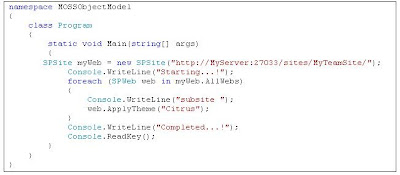
Whenever he executes the above query he got the Access denied error. He asked me to resolve this issue.
Initially I thought it could be some permissions issue with MOSS users. But later I found that the need a workaround with AD and DNS configuration.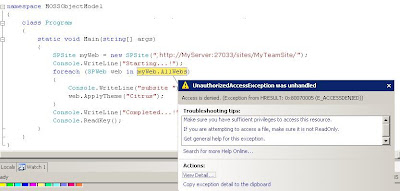
Here I will explain you what are the necessary steps I did to resolve the issue.
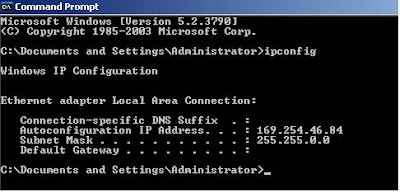
First cross check the IPconfig at Command prompt looks no IP has obtained and DNS not configured properly.
Go to ControlPanel ->NetworkConnections -> Local Area Connections à properties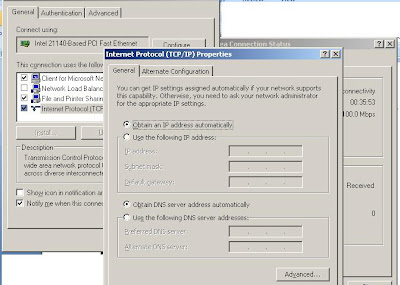
This looks no configuration done for DNS and its taking dynamic Ip address.
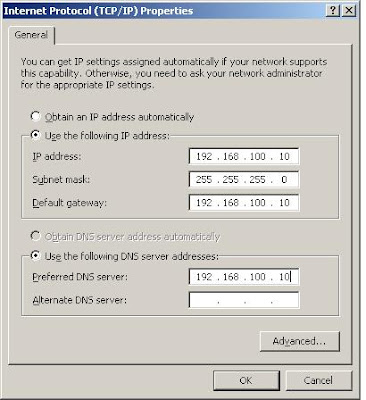
Now lets change into static IP-address as mentioned in below screenshot
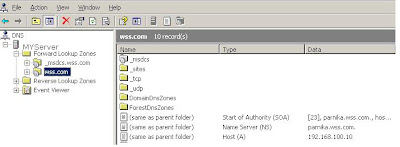
Now go to ControlPanel-> Administrative Tools -->DNS
Below is my Simple code

Whenever he executes the above query he got the Access denied error. He asked me to resolve this issue.
Initially I thought it could be some permissions issue with MOSS users. But later I found that the need a workaround with AD and DNS configuration.

Here I will explain you what are the necessary steps I did to resolve the issue.
First cross check the IPconfig at Command prompt looks no IP has obtained and DNS not configured properly.

Go to ControlPanel ->NetworkConnections -> Local Area Connections à properties

This looks no configuration done for DNS and its taking dynamic Ip address.
Now lets change into static IP-address as mentioned in below screenshot

Now go to ControlPanel-> Administrative Tools -->DNS

Delete the existing Forward Lookup Zones ( delte wss.com and delete from root level)

Now right click My server -> new Zone and follow the steps mentioned below.
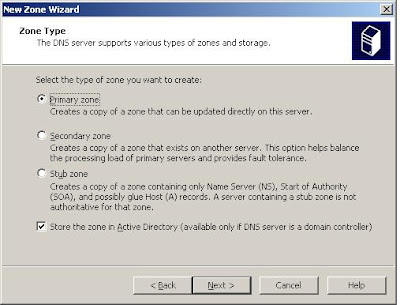

Now right click My server -> new Zone and follow the steps mentioned below.


Now finally Goto C:\Windows\System32\Drivers\etc and open the hosts file in notepad
And add your Server under localhost

Restart the DNS
Restart IIS
Restart the OS
After doing all these activity issue has been resolved.
You can reach me @ raj.webjunky@yahoo.com


