Friday, 10 August 2012

BizTalk ESB Toolkit BAM Track SOAP Fault

Problem statement : 
An event of SOAP fault we do not have any control to correlate the mesage(SoapFault message) with requst message hence the BAM Track created an enty without correlate with request message.

Quite busy with many other issues, soon will post the article.
cheers...

Wednesday, 20 June 2012

How to use Static ports with BizTalk ESB ToolKit


How to use Static ports with BizTalk ESB ToolKit


Couple of month’s back I had a situation to submit 7million records (onetime activity) to WCF service endpoint using BizTalk ESB toolkit. Potentially it is a performance issue for high volume of data using Biztalk Dynamic Ports.
However I cannot change my ESB Solution for the sake of one time activity.
It was working fine when I submit 100’s of records per day but when I started dumping the huge amount of data with Dynamic ports created  lot of performance issues and it even created a problem for Server reboot.
Initially the BizTalk SendHost consumed lot of memory and later got timeout errors and so on.  Hence my investigation began to find alternate way. 
Because of the production Issue I cannot propose any new development so the best alternate way is to using the static Ports.
Here are my findings
As you know you cannot find Static Ports Names at Off-Ramp while Design Itinerary.
It’s quite easy to handle this situation, first thing is to create Dynamic Ports for required endpoint and build the solution.
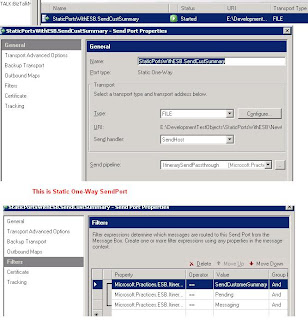
Once all the deployment complete , Lets create Static Port with ESB Filter properties.
Here is the sample for Submit data to FILE Location using DynamicSendPort


And the Itinerary Process design is


After successful deployment of Itinerary change the Delete the DynamicPort and create StaticPort with Filter properties as mentioned below.


You can reach me @ raj.webjunky@Yahoo.com

Monday, 12 March 2012

BizTalk ESB Tool Kit 2.1 Working with FTP - Static Resolver


BizTalk ESB - Static Resolver - FTP Adapter  Config

Working with FTP is always a trick. Here I am discussing more about ESB ToolKit 2.1 - FTP adapter.

Couple of things to remember while you configure the FTP adapter using Static Resolver.


1. Unable to enter Username and Password

By Default the Username and Password fields are disabled mode, Hence you cannot enter Username and Password by clicking the […] ( popup window). Instead what you can do is Type the following at Endpoint Configuration.

                 UserName=TestUser&Password=TestPassword


 2. Adding default FTP folder location

You cannot enter the ftp folder name followed by ServerName/IP.
I have been trying to drop a file to the Ftp location “\TestRoot\Inbox” and my Ftp configuration as below

                   
ftp://ABCServer\TestRoot\Inbox\Test_%MessageID%.txt


This looks fine to me and ESB is able to communicate the server “ABCServer” but keep saying “folder "\TestRoot\Inbox" not found” and suspended the instance.
The fix is : /\ ( bit funny ??) , yes you need to enter the folder name as below

                  ftp://ABCServer/\TestRoot\Inbox\Test_%MessageID%.txt


The FTP Configuration looks like below


BRE Configuration for FTP


UDDI Configuration for FTP


Drop a comment if this article helped you to solve your problemyou can reach me @ raj.webjunky@yahoo.com

Thursday, 8 December 2011

BizTalk 2010 R2


Good news for BizTalk guys

Microsoft is getting ready to release a new version BizTalk.
Hope to hear official new from Microsoft soon.

Here is link for more details about BizTalk 2010 R2

http://blogs.msdn.com/b/biztalk_server_team_blog/archive/2011/12/08/biztalk-server-2010-r2.aspx?utm_source=twitterfeed&utm_medium=twitter

cheers..

Thursday, 17 November 2011

BizTalk Published Service Certificate Authentication Consume by Java Client – Part2

BizTalk Published Service Certificate Authentication Consume by Java Client – Part2


Here I am describing about how to test the service which has metroBinding using WCFTestClient / Console application

All you need to is update the Client Configuration with required binding and behaviour configurations configurations.Hope you are aware of how to add a reference to your Console application / add service to WCFTestClient

You can test metrobinding service by adding binding and behavior configurations to the endpoint service.


For binding config add , “customBinding“ / “ws2007HttpBinding” binding.
For behavior add “clientCredentials” and mention your client and server certificates for mutual authentication.

Here I will talk about ws2007HttpBinding only which is quite easy than customBinding.
As we discussed in
Part-1 about how to create certificates and configuring at server application, we will be using same certificates at client application too.


Drop a comment if this article helped you to solve your problem
also you can email me for complete solution zip file to download
you can reach me @ raj.webjunky@yahoo.com


Tuesday, 1 November 2011

ESB Toolkit - Itinerary Designer error when saving The xml element {0} could not be found in the xml document

While saving the itinerary you might find a difficulty and you faced the below error

Itinerary Designer error when saving - "The xml element {0} could not be found in the xml document


This is quite simple to fix it. When I was working with ESB Tookit 2.1 in beginning days I had this issue and I spent a quite lot of time fix this issue, I did a Install and and uninstall of ESB.


Funny, I even reinstalled of VS2010 too :-) later I found its nothing to do with installation its simple trick , all you have to do is Open your itinerary Properties window and set below properties


Encryption Certificate=My;CurrentUser;
Export Mode = Strict
Required Encryption Certification=False

You can also find my posting at Microsoft ESB Toolkit Forums :
http://social.msdn.microsoft.com/Forums/en/biztalkesb/thread/9d4d87d3-e7ea-400e-8d51-337fc1aebf37 ( buddu78)

Monday, 31 October 2011

BizTalk Published Service Certificate Authentication Consume by Java Client Part1

BizTalk Published Service Certificate Authentication Consume by Java Client - Part1

I had a situation where my BizTalk published wcf service is consume by non .net Framework applications like java.I have been trying to accomplish this task for last one month but could not get right answer. After regressive search I found a useful class library which can support .net applications and java with supporting NetBeans 7.0 or higher class library.

As I mentioned in the title, I will explain you how to secure your BizTalk published (schema/Orchestration) WCF Service.Here I am not keen to describe the steps to publish Schema / Orchestration as WCF Service. If you are looking for “How to publish” refer this link
http://msdn.microsoft.com/en-us/library/bb226564(v=bts.70).aspx

Step:-1
First step is to download the “WCF Express Interop Bindings 1.0.zip.zip“ file and install on your development box.http://wcf.codeplex.com/releases/view/68276

Step:-2
Amend machine.config file with metroBinding.

If you are running with .net Framework 4.0 then you need to update in two machine configuration files

1. C:\Windows\Microsoft.NET\Framework\v2.0.50727\CONFIG\machine.config
2. C:\Windows\Microsoft.NET\Framework\v4.0.30319\Config\machine.config

If you are running with .net Framework 4.0 under 64bit windows then you need to update in another two machine configuration files

1. C:\Windows\Microsoft.NET\Framework64\v2.0.50727\CONFIG\ machine.config
2. C:\Windows\Microsoft.NET\Framework64\v4.0.30319\CONFIG\ machine.config

Add Binding Extensions
Name ="metroBinding" type="Microsoft.ServiceModel.Interop.Metro.Configuration.MetroBindingCollectionElement, Microsoft.ServiceModel.Interop, Version=1.0.0.0, Culture=neutral, PublicKeyToken=4fc38efee625237e"

Add Client endpoint

binding="oracleEBSBinding"
contract="IMetadataExchange"
name="oracleebs"
your machine.config should look like below


Note: Make sure you back up of each machine.config file before you update.

So far we have done the install and configure the metro binding. Now we do the actual BizTalk configuration and testing part.

Step:-3
Generate Server and Client certificate to authenticate the service for “Mutual authentication” process

Generate Server Certificate
makecert -r -pe -n "CN=BTSTestServerCertificate" -sky exchange BTSServerCert.cer -sv BTSServerCert.pvk
pvk2pfx.exe -pvk BTSServerCert.pvk -spc BTSServerCert.cer -pfx BTSServerCert.pfx

Generate Client Certificate
makecert -r -pe -n "CN=BTSTestClientCertificate" -sky exchange BTSClientCert.cer -sv BTSClientCert.pvk
pvk2pfx.exe -pvk BTSClientCert.pvk -spc BTSClientCert.cer -pfx BTSClientCert.pfx

Install Server and Client certificates (.cer) at Trusted Root Certification Authorities

Install Server and client Personal Information Exchange (.pfx) files at Personal Tab

If java client is consuming the BizTalk published service then you need to send Server and Client .pfx files to Java guys to generate .jks (Java Key store file) file

Step:-4
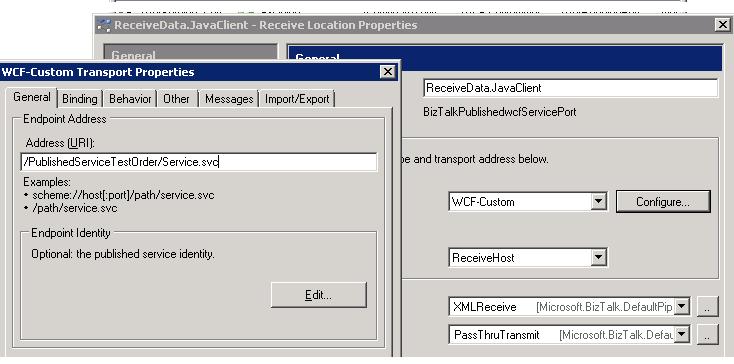
Create Two-Way receiveLocation for the published service ( if you have mentioned application name during le publishing Wizard open the receive location)
use WCF-Custom / WCF-CustomIsolated adapter and then use metrobinding to configure the Certificate authentication.

Selecting adapter and General Configuration


MetroBinding – General configuration


MetroBinding – Security configuration


Behavior Configuration


You are ready with certificate authentication for BizTalk published WCF service. You can use this service to consume .net and non .net application like Java.

I will update you on my next article for how to test using “.net client

Continue -- Part-2

Drop a comment if this article helped you to solve your problemalso you can email me for complete solution zip file to download
you can reach me @ raj.webjunky@yahoo.com