Friday, 21 January 2011

Schema referenced by Map has been deleted. BizTalk Server group configuration is out of date

While doing a Development with Oracle Extracted Schemas my Visual Studio 2010 fired an below error when I tried to deploy my solution.
Schema referenced by Map "mapOrders" has been deleted. The local, cached version of the BizTalk Server group configuration is out of date. You must refresh the BizTalk Server group configuration before making further changes.
I tried
1.refreshing the BizTalk Group - No Luck
2.Close Visual Studio and BizTalk Admin Console - No use
3.Restarted SQL Service - No Use
I still facing same error.
Finally I removed an Entry at BizTalk management Datbase and it worked.
First Check your BizTalk Object name in bt_mapSpec Table
Select * from bt_mapspec
Delete an entry from bt_mapSpec table.
Delete from bt_mapspec Where itemid=


Drop a comment if this article helped you to solve your problem
You can reach me @
raj.webjunky@yahoo.com


Friday, 14 January 2011

ESB Remove ,Add Namespace Pipeline Components usage-Restful Service

ESB Remove ,Add Namespace Pipeline Components usage -Restful Service
This is an simple example for "How use Remove and Namespace of ESB Pipeline Components"
I received a message from Restful service which is a string format.
I tried to assign this message into predefined XSD structure on my ESB Offramp Receive.
However I endupt with different errors.
After a good amount of study in ESB pipeline ComponentsI found the best way to achive this is utilize existing Remove namespace and add namespace components.
My Restful response message


My Predefined output message Structure


Create Custom pipeline and add Components as mentioned below
Name : ReceivePipeline
Decode : ESB RemoveNamespace
Decode
: ESB Add Namespace
Decode :ESB Itinerary Cache
Disassemble : XML Disassembler
ResolveParty : ESB Dispatcher
ESB Add Namespace Component Configuration properties
ExtractionNodeXpath = /string
NameSpaceBase =http://TestOrder.Schemas.RestResponse
NamespacePrefix =ns9 ( do not enter from ns0 to ns6)

Refere further details of add Namespace
http://msdn.microsoft.com/en-us/library/ff649945.aspx


Drop a comment if this article helped you to solve your problem
You can reach me @
Raj.webjunky@yahoo.com

Monday, 6 September 2010

BizTalk XSD Schema Create Unlimited child record

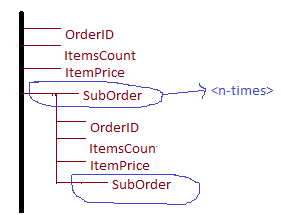
How to create a Schema which can have Unlimited child record?

This is a bit tricky : when you click on the parent node it will allow you to create unlimited sub Node.
Follow the below steps to achive creation of unlimited suborders nodes.
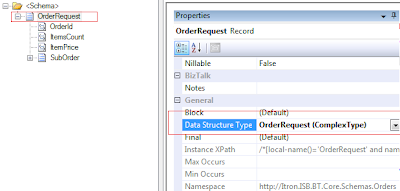
Step1: In OrderRequest rootNode Type "OrderRequest" in DataStructureType property and press Enter


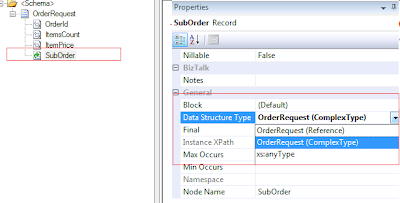
Step2: Select SubOrder Record Node and select "OrderRequest(ComplexType)" from the List


Step3: Select your BizTalk Mapper and select OrderRequest Message and try to expand the SubOrder as many times as you click Suborder ..it creates that many times of child records

You can reach me @ raj.webjunky@yahoo.com


Thursday, 19 August 2010

BizTalk BAM Install Error windows 7 64-bit

I have been trying to install BAM Portal in my new windows7 64-bit Operating system but I encounted an error while installing BAM. The error details shown blow.


Fix is very simple .. Open your IIS7 and goto AppPool and allow 32bit Applications to allocate the AppPool.


You can reach me @ Raj.webjunky@yahoo.com

Monday, 19 July 2010

BizTalk Adapter Pack 2.0 – OracleDBBinding adapter

I have been trying to connecting to Oracle Database Table to fetch the data using BizTalk Adapter Pack 2.0 and converted in form of XML.

This is an very basic and simple task, but I did not find any useful article to explain step by step process of extracting schema and Configuration part in BizTalk side while consume Oracle Table/View/Stored Proc. Apparently BizTalk receive location configuration.

After three days of trail I could achieve this simple task. Hope this can give you a clear picture of how to extract a Table data using simple SQL Statement in BizTalk.

Make sure you install BizTalk Adapter Pack 2.0 and Oracle Client before you start this example.
To install BizTalk Adapter Pack 2.0 :
http://www.microsoft.com/biztalk/en/us/adapter-pack.aspx
Basic configuration settings for Oracle Database :
http://rajwebjunky.blogspot.com/2010/07/biztalk-adapter-pack-working-with.html
Apparently configure the Oracle Host & Host Instance at BizTalk Admin Console.

Task: I am going to perform a retrieve data from LoanMaster and result to be converted into XML file and drop into my Local Folder, program flow described in below flow chart.

Step1: First you need to generate Table/View/Stored Proc schema in BizTalk application, This is an standard procedure which we follow for SQL Server or any other database.

However for Oracle database it has additional configuration settings to be done and you should generate a schema for POLLINGSTMT operation. Otherwise you will end up with many errors.

Right click your project and select “Add Generated Items” and select “Consume Adapter Service” from Left pane and select “Consume Adapter Service” from Right pane and Click OK
Key things to follow while Generating the Schema for POLLINGSTMT
1. Polling ID = 23 (can be any number but same number should mention in
ReceiveLocation configuration settings)

2. PollingStatement = Select * from LoanMaster
3. Select the contract type as Service (Inbound operation)

4. Click Root (/) and select POLLINGSTMT operation in right list boxall the above steps shown in below screenshots


Step2:Finally you can find a Schema to be generated in you Project and that will have a POLLINGSTMT Node along with you will also find POLLINGSTMTRECORD, ArrayOfPOLLINGSTMTRECORD nodes. I am not going to discuss about other two nodes in this article.
while Creating a corresponding message at Orchestration view (Message_1) assign the POLLINGSTMT node as your Incoming Message.
Step3: Orchestration looks like below

Step4: Receive Location1
At BizTalk Receive Location side you need to perform same configuration settings which you have mentioned in Step-1

Polling ID =23 ( what ever number you mentioned in Step1- same Number should use here)PollingStatement = Select * from LoanMasterNow Build and test your application. Hope you might get some warning messages, ignore it and check your Local Folder for Output.
Reach me if you need any clarifications @ raj.webjunky@yahoo.com

Friday, 16 July 2010

BizTalk Adapter Pack - Working with Oracled Database Adapter

I am trying to connect to ORACLE database directly using BizTalk Adapter Pack and when I try click Connect at Add generated schema It was throwing the below error
Could not load file or assembly 'Oracle.DataAccess, Version=2.111.7.0, Culture=neutral, PublicKeyToken=89b483f429c47342' or one of its dependencies. The system cannot find the file specified.

You can fix the above issue by installing the Oracle client ( correct version) and bit of Configuration at your Box.

Step:1 Install the BizTalk Adapter from below location http://www.oracle.com/technology/software/tech/windows/odpnet/utilsoft.html
and download the ODAC1110720.zip 188 MB Zip file

Note: Different version of Oracle Client will remains to throw same error at BizTalk side

Step2: Once you installed the Oracle Client then find out the TNSNAMES.ORA file from below location

\app\product\11.1.0\client_1\Network\Admin
if you don not find them no worries.. you can copy the file from \Samples Folder and modify the File with your Server IP/Name and Port number and Database Name.

Example :
OracleTest = (DESCRIPTION = (ADDRESS = (PROTOCOL = TCP)(HOST = Dev_OracleServer)(PORT = 1521)) (CONNECT_DATA = (SERVER = DEDICATED) (SERVICE_NAME = Dev_OracleTestDB) ) )
NOw you can try to do a OracleBinding adapter, hope you will win...

Reach me if you still find an issue raj.webjunky@yahoo.com

Wednesday, 14 July 2010

BizTalk 2009 Configuration Error- Failed to connect to the SQL database 'SSODB' on SQL Server

I am trying to install BizTalk 2009 [Visual Studio 2010] on Windows XP SP3 Operating System today and I end up with error Failed to connect to the SQL database 'SSODB' on SQL Server while configuring BizTalk 2009.


I fixed this issue by registering the SSOSQL.dll file in my system
Steps:
Open your VisualStudio Command Prompt and type
regasm "C:\Program Files\Common Files\Enterprise Single Sign-On\SSOSQL.dll"


Reach me @ raj.webjunky@yahoo.com