Monday, 7 September 2015

BizTalk Untyped Message Promoting MessageType Context Property

Handling UntypedMessage message is a bit of fun in BizTalk . You could assign anytype of message at your construct shape and submit to messageBox. However Untypeed message will not promote MessageType to BizTalk Context.

Here is a simple scenario where you would need a MessageType is a Key Element to handle at your BizTalk Send Port Collection.

Scenario :  An orchestration designed with Request-Response Port which receive multiple requests (Schema published as WCF Service) and you would eventually submit transformed message to SEND Port.
The Send Port Message has been defined as UnTyped Message. So the Static SendPorts has configured at Biztalk Admin Console to Subscribe a request based on MessageType Filter property.

Problem:
When I submit a Untyped message to SendPort it doesn't recognize the Message due to missing the Context property of "BTS.MessageType"
So I tried by adding Correlation as BTS.MessageType at SendPort but it doesn't work. Finally I made a simple component which promote MessageType for UnTyped Message.

Solution :
----------------------------------------------------------------------------------------------------------------------
namespace RajWebjunky.Utility
{
    [Serializable]
    public class ContextPromoteHelper
    {
        //Assingn Context message for incoming "UnTyped" message
        public static void PromoteMessageType(XLANGMessage inMessage)
        {
            ReceivePipelineOutputMessages pipelineMsg = XLANGPipelineManager.ExecuteReceivePipeline(typeof(Microsoft.BizTalk.DefaultPipelines.XMLReceive), inMessage);
            pipelineMsg.MoveNext();
            pipelineMsg.GetCurrent(inMessage);
        }
    }
}
----------------------------------------------------------------------------------------------------------------------
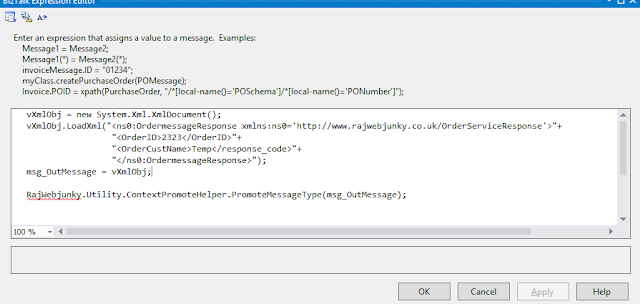
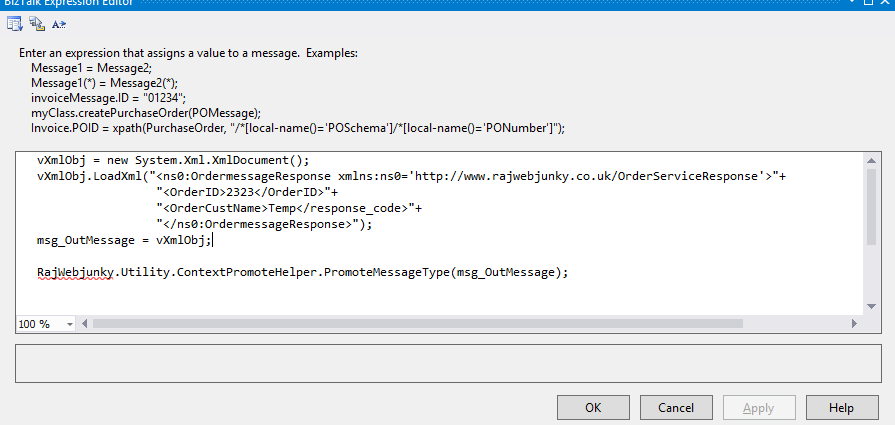
The above component should invoke before you submit message to SendPort
at your Orchestration Construct Shape

Drop a comment if this article helps you. you can reach me @ raj.webjunky@yahoo.com

Wednesday, 24 June 2015

Biztalk Map handling Nillable check

BizTalk Map Handling Nill Check Using XSLT Call Template
During my development I found its really painful job to adding too many functoid to achive nill check. Imagine if you have 10 or 20 elements which would required Nill check ?

you can achieve this in two ways  
  1. Using standard Functoids
  2. XSLT call Template 

Both performs same action but your Mapping sheet would be easy and understandable if one uses a XSLT call template.


Option 1 : Using standard Functoids


in above map I have Name element which I need to perform nill check. This works perfectly but you would need more time to add 4 functoids for each element.

Option2 : XSLT Call Tempalte
I am using the below XSLT Call template for POID element which  performs same checks like standards functoids


Drop a comment if this article helps you. you can reach me @ raj.webjunky@yahoo.com

Thursday, 30 April 2015

Terminate Active Isolated Adapter (Isolated Host Instances ) Instances - SQL Script


I have been trying to delete the Active Instances in my BizTalk Admin Console which are related to IsolatedHost Instance.

I knew that I have to be patient enough to suspend/ terminate or may be Restart IIS could give a bit of breathing to clear them from console.

What if you curious to terminate them quickly ( not in production ) ? here is the simple Database script which would help you to crack the wall.


USE BizTalkMsgBoxDb

DECLARE @ServiceInstanceID VARCHAR(100)
DECLARE @ServiceID VARCHAR(100)

DECLARE ActiveInstance_cursor CURSOR FOR SELECT [uidInstanceID] ,[uidServiceID] FROM [BizTalkMsgBoxDb].[dbo].[Instances]  WHERE nState = 2

OPEN ActiveInstance_cursor

FETCH NEXT FROM ActiveInstance_cursor  INTO @ServiceInstanceID, @ServiceID
PRINT 'Note : Please start all BizTalk HostInstances before running this script..'
PRINT 'Warning : Start terminating the Active instances... please be aware that, you could potentially missing the data..! '

WHILE @@FETCH_STATUS = 0
BEGIN
DECLARE @out INT
BEGIN TRANSACTION
exec dbo.int_AdminTerminateInstance_BizTalkServerIsolatedHost @ServiceInstanceID, @ServiceID ,@out
COMMIT

FETCH NEXT FROM ActiveInstance_cursor INTO  @ServiceInstanceID, @ServiceID
END

CLOSE ActiveInstance_cursor
DEALLOCATE ActiveInstance_cursor

PRINT 'Completed...!'


Drop a comment if this article helped you to solve your problem. you can reach me @ raj.webjunky@yahoo.com

Wednesday, 18 February 2015

ReceivePipeline Decode stage MessageType Context Property


I had a situation to capture the MessageType at Receive Pipeline "Decode" Stage  and eventually pass the MessagType to BRE which will executes rule based on MessageType and finally it returns a some Business routing value.

I tried with classic method like below

strMsgType = inmsg.Context.Read("MessageType", BTS_NAMESPACE).ToString();

But during run time I received an error "Object reference not set to an instance of an object."
You may be surprised why would pipeline throw an error to extract MessageType ? but it is true. When I extracted all list of properties at decode stage and couldn't find the MessageType from the Context which is correct because biztalk would generate this property after Disassemble stage.

So how do I get MessageType ? write a custom code ? yes that would be a best option and your hands on.. here is the little code which I have written to build a MessageType at Decode stage. Hope this would help you.
If you have any better Idea, please feel free to drop a comment


 ----------------------------------------------------------------------------------------------------------     
public  string ExtractMessageType(Microsoft.BizTalk.Message.Interop.IBaseMessage message)

        {
            string strValue = String.Empty;
            try
            {
                int bufferSize = 0x280;
                int thresholdSize = 0x100000;

                IBaseMessagePart bodyPart = message.BodyPart;
                Stream inboundStream = bodyPart.GetOriginalDataStream();
                VirtualStream virtualStream = new VirtualStream(bufferSize, thresholdSize);
                ReadOnlySeekableStream originalStrm = new ReadOnlySeekableStream(inboundStream, virtualStream, bufferSize);

                originalStrm.Seek(0, SeekOrigin.Begin);

                XmlTextReader xmlTextReader = new XmlTextReader(originalStrm);
                XPathCollection xPathCollection = new XPathCollection();
                XPathReader xPathReader = new XPathReader(xmlTextReader, xPathCollection);

                while (xPathReader.Read())
                {
                    strValue = xPathReader.NamespaceURI + "#" + xPathReader.LocalName;
                    break;
                }
                originalStrm.Seek(0, SeekOrigin.Begin);
                bodyPart.Data = originalStrm;

                return strValue;
            }
            catch (Exception e)
            {
                return strValue;
            }
        }
----------------------------------------------------------------------------------------------------------

Tuesday, 21 October 2014

BizTalk BTDF Copy all files ,folders and subfolders

I use to write a bunch of lines of code to create folders and subfolders to copy along with BTDF Package.  I was't sure how to copy all files and fodler in single line of code and could't find any clue when I googled.

If I have a Directory stucture  like
Folder1 -> SubFolder1 -> SubSubFolder1->*.*   and so on it was quite hard to keep adding
< copy > nodes under   Target Name="CustomRedist" node for each Folder and subfolders.

Recently I found a better way of copying all folder , subfolder and all files using "RecursiveDir" option using BTDF.  Hope this would help you to minimize the code.

Code:


Result :
It copied below list of folders and files  at package  Installed folder.


Drop a comment if this article helps you to solve your problemYou can reach me @ raj.webjunky@yahoo.com

Friday, 17 October 2014

BizTalk Deploy Map Stored procedure returned non-zero result Microsoft.BizTalk.Deployment.Assembly.BtsMap.Save()


You might be surprisd to see unknown error messag while you are deploying the bizTalk maps using Visual studio  or deploy maps directly using add as resource. I googled nearly 1 day to find a right fix but could't find any.

I could find a un expected error as detailed below.

Error :

Failed to deploy map "MyTestMapName".
Error saving map. Stored procedure returned non-zero result. Check if source and target schemas are present.


Error 140 at Microsoft.BizTalk.Deployment.Assembly.BtsMap.Save()
   at Microsoft.BizTalk.Deployment.Assembly.BtsArtifactCollection.Save()
   at Microsoft.BizTalk.Deployment.Assembly.BtsAssembly.Save(String applicationName)
   at Microsoft.BizTalk.Deployment.BizTalkAssembly.PrivateDeploy(String server, String database, String assemblyPathname, String applicationName)
   at Microsoft.BizTalk.Deployment.BizTalkAssembly.Deploy(Boolean redeploy, String server, String database, String assemblyPathname, String group, String applicationName, ApplicationLog log) 


Solution :
What I could find here was, you might be referring the wrong schemas at source  or destination of your map. I am really surprised how map does not recognize the Schemas when they were not in list.

Step1 : deleted all .cs class for each map which you have at solution
Step2 : re- refer the source and destination schemas
Step3:  Clear Bin folders and Rebuild and Deploy the solution.

It worked for me with above steps, hope you can solve it too.

Drop a comment if this article helped you to solve your problemYou can reach me @ raj.webjunky@yahoo.com


Thursday, 1 May 2014

Add User permissions for EventSource Registry -Powershell

I had a situation to create 10 event sources at registry and add 4 different level of permission for each event sources. This would be an easy and manual task when you want to add it for only one server.

What If you need to do similar job for 10 different servers?  I presume deployment Engineer would take minimum of 1 hour time to do this task. don't you think?


Here is the another way to reduce the time by writing Powershell script.


-------------------------------------------------------------------------------------------------------------------------------

$userInput = Read-Host "Enter the Environment (DEV / SYS ) :"

function AddEventPermissions([string]$Principle, [string]$LogName)
{
    $LogPath = "HKLM:\SYSTEM\CurrentControlSet\services\eventlog\Application\" + $LogName;
    if(Test-Path $LogPath)
    {
        $acl = Get-Acl $LogPath
        $access = [System.Security.AccessControl.RegistryRights]"FullControl"
        $inheritance = [System.Security.AccessControl.InheritanceFlags]"ObjectInherit,ContainerInherit"
        $propagation = [System.Security.AccessControl.PropagationFlags]"None"
        $type = [System.Security.AccessControl.AccessControlType]"Allow"

        $rule = New-Object System.Security.AccessControl.RegistryAccessRule($Principle,$access,$inheritance,$propagation,$type)
        $acl.AddAccessRule($rule)
        
        Set-Acl $LogPath $acl
    }
    else
      {
        Write-Error "Cannot acesss log $LogName"
      }
}

$AppGroup ='';
$isloatedGroup='';

if  ($userInput  -eq "DEV")
{
    $AppGroup ='Domain\DEVUserAccount';
}
elseif ($userInput -eq "SYS")
{
    $AppGroup ='Domain\SYSUserAccount';
}
else
{
    Write-Error "Please select required Environment to Add event log permissions.";
}

if ( $userInput -eq "")
{
    try
      {
            AddEventPermissions $AppGroup 'MYEventLogSource'
       }
      catch [System.Management.Automation.RuntimeException]
        {
            write-Error "Error while adding permissions: $_.Exception.ToString()"
        }
}
---------------------------------------------------------------------------------------------


Drop a comment if this article helped you to solve your problem. you can reach me @ raj.webjunky@yahoo.com