Monday, 5 June 2017

Read XPath value from XML file

Reading xpath value from XML file 

As stated above  its easy way to read the xpath query using XMLreader and XPATHDocument;
Below is the sample code 


using System.Xml;
using System.Xml.XPath;

private string ReadXpath(string xmlFilePath , string xPath)
        {
            string xpathValue="";

            XmlReader reader = XmlReader.Create(xmlFilePath);

               if (reader.Read())
                {
                    XPathDocument xPathDoc = new XPathDocument(reader);
                    XPathNavigator xNavigator = xPathDoc.CreateNavigator();
                    XPathNodeIterator xNodes = xNavigator.Select(xPath);

                    if (xNodes.Count != 0 && xNodes.MoveNext())
                    {
                        xpathValue = xNodes.Current.Value;
                    }
                }

            return xpathValue;
        }

Wednesday, 22 March 2017

BizTalk RuleEnginer Unable to deploy - Associated with the deployment driver does not match the database

BizTalk Rule Composer does not allow me to deploy a Policy and throwing an error  "Associated with the deployment driver does not match the database".

I am sure I have used the correct database Alias name while Configuring the BizTalk. Unfortunately some unknown reason BizTalk configuration did not store the Rule Engine Server details and Database name at Management Database. 
This would be a potential issue while you are deploying the Policy using Rule Composer and would throw below error.


Solution : Open Admin_Group table from Management database and Update the RuleEnginerDatbaseName and RuleEnginerDBName buy running Update Query script.


Drop a comment if this article helps you. you can reach me @ raj.webjunky@yahoo.com

Wednesday, 11 May 2016

BizTalk PortBindingMaster file - Password as Configurable key

BizTalk  PortBinding Master file - Password  as  Configurable key.

I knew its old technique but I just want to blog it for quick reference.


Drop a comment if this article helps you. you can reach me @ raj.webjunky@yahoo.com

Monday, 11 January 2016

Site Visitors


I am delighted to say my Blog visitors head count has been dramatically increased from 10K+  to 30K+.

Thanks all readers who likes to view my Blog.

Raj.webjunky

BizTalk XSD- Import multiple schema's with same TargetNamespace


BizTalk  XSD Schema does not allow you to Import more then one schema which has same TargetNameSpace.

There are some situation you might need to reuse the existing schema's without re-creating the same structure with another set of Target namespace.
Wonder if you ever tried to add same targetnamespace schema using VisualStudio BizTalk Project.

Here is the error message you would get it

The namespace of the schema you are trying to add clashes with one of the namespaces already declared. Please choose another Schema.


Here is the alternate way of adding multiple schema's with one unique Target Namespace.

1. Select Schema which you would like to import and find "Fully Qualified Name"
    in my Solution I have a Project called "PublishSchemaTest.Common" which has common Schemas.
   And my Fully Qualified Name is "PublishSchemaTest.Common.CommonTypes"

2. Find Schema Target NameSpace in my case it is "http://www.rajwebjunky.com/Common//Types".

3. Add your Common schema project reference
4. Now Open the Schema which you prefer to import the CommonTypes

My OrderMaster XML Edit mode looks like below.


4. Add Import Schema manually 


5. Save the File and open in BizTalk Editor Mode . Now you would be able refer the schema at "Data Structure Type"


Drop a comment if this article helps you. you can reach me @ raj.webjunky@yahoo.com


Thursday, 31 December 2015

BizTalk Published Service SingleWSDL -schemaLocation is missing , Cannot import wsdl:portType

Error: Cannot import wsdl:portType
Detail: An exception was thrown while running a WSDL import extension: System.ServiceModel.Description.DataContractSerializerMessageContractImporter
Error: The required attribute 'schemaLocation' is missing.

I have been publishing number WCF services using BizTalk Schema's  and I never encountered any issues when end client generating a proxy class using  direct service url  or singlewsdl url.

Recently one  of my client had an issue with service which I recently published. I was really skeptical about the issue and I was keep asking him to try different ways, in fact I requested to use new .net SDK to use it.


after course of attempts I realized that service was throwing an unknown error as below


Attempting to download metadata from 'http://ccrsd027.stl.int/PublishSchemaTestService/PublishTest.svc?singleWsdl' using WS-Metadata Exchange or DISCO.
Error: Cannot import wsdl:portType
Detail: An exception was thrown while running a WSDL import extension: System.ServiceModel.Description.DataContractSerializerMessageContractImporter
Error: The required attribute 'schemaLocation' is missing.XPath to Error Source: //wsdl:definitions[@targetNamespace='http://PublishSchema.Test/']/wsdl:portType[@name='PublishTest']


Error: Cannot import wsdl:binding
Detail: There was an error importing a wsdl:portType that the wsdl:binding is dependent on.
XPath to wsdl:portType: //wsdl:definitions[@targetNamespace='http://PublishSchema.Test/']/wsdl:portType[@name='PublishTest']
XPath to Error Source: //wsdl:definitions[@targetNamespace='http://PublishSchema.Test/']/wsdl:binding[@name='WSHttpBinding_ITwoWayAsync']


Error: Cannot import wsdl:port
Detail: There was an error importing a wsdl:binding that the wsdl:port is dependent on.
XPath to wsdl:binding: //wsdl:definitions[@targetNamespace='http://PublishSchema.Test/']/wsdl:binding[@name='WSHttpBinding_ITwoWayAsync']
XPath to Error Source: //wsdl:definitions[@targetNamespace='http://PublishSchema.Test/']/wsdl:service[@name='BizTalkServiceInstance']/wsdl:port[@name='WSHttpBin
ding_ITwoWayAsync']


Generating files...
Warning: No code was generated.
If you were trying to generate a client, this could be because the metadata documents did not contain any valid contracts or services
or because all contracts/services were discovered to exist in /reference assemblies. Verify that you passed all the metadata documents to the tool.

Warning: If you would like to generate data contracts from schemas make sure touse the /dataContractOnly option.


The root cause of the above problem was I had a Common Types schema which I included for my Generic complex types schema

When you Generate a SingleWSDL SVCUTIL tool generates a single WSDL File which includes all referenced schema's. however the Included schema's does not work when you generate a Proxy class using SvcUtil.exe.

The Fix is very simple:
Generate a Single WSDL file and open in Note pad (NotePad++) and identify a schema which you originally included a schema and simply Delete the auto generated empty include node 

and save the wsdl and try SvcUtil.exe "UpdatedSinglewsdl.wsdl"
Drop a comment if this article helps you. you can reach me @ raj.webjunky@yahoo.com

Tuesday, 15 September 2015

BizTalk SSO Manager A new Tool to manage your SSO settings

BizTalk SSO Manager Tool :

Aim : Aim to Create a new SSO application without  deploying your BizTalk solution and also manage your existing settings or add new configuration values for existing deployed interface.

Background : If you deploy a BizTalk interface in any environment with SSO enable ) 
True )
at you BDDF project , it would eventually deploy the solution and publish your environment settings to SSO. This is great option in BTDF. However it is quite hard to manage the settings in case of any changes like Add / Delete new entry , Delete Complete SSO settings without un-deploying the BizTalk interface or event Create a New SSO Application without deploying BizTalk interface.


This tool would be a best solution for you play. 

Screen1a : When you run the tool by default it loads the applications which are deploying using BTDF. 


Screen1b :  You can add new Row / update existing row.

Screen2 : You are in free hand to create a Brand new Application without deploying a BizTalk interface


Screen3 : You can even Delete complete SSO settings without un-deploying a BizTalk interface


Drop a comment if this article helps you. you can reach me @ raj.webjunky@yahoo.com
If you wish to download the code drop your comments.


Monday, 7 September 2015

BizTalk Untyped Message Promoting MessageType Context Property

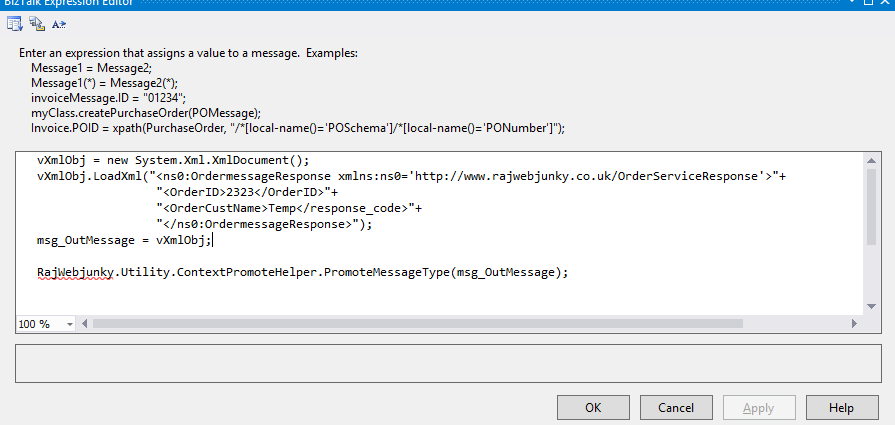
Handling UntypedMessage message is a bit of fun in BizTalk . You could assign anytype of message at your construct shape and submit to messageBox. However Untypeed message will not promote MessageType to BizTalk Context.

Here is a simple scenario where you would need a MessageType is a Key Element to handle at your BizTalk Send Port Collection.

Scenario :  An orchestration designed with Request-Response Port which receive multiple requests (Schema published as WCF Service) and you would eventually submit transformed message to SEND Port.
The Send Port Message has been defined as UnTyped Message. So the Static SendPorts has configured at Biztalk Admin Console to Subscribe a request based on MessageType Filter property.

Problem:
When I submit a Untyped message to SendPort it doesn't recognize the Message due to missing the Context property of "BTS.MessageType"
So I tried by adding Correlation as BTS.MessageType at SendPort but it doesn't work. Finally I made a simple component which promote MessageType for UnTyped Message.

Solution :
----------------------------------------------------------------------------------------------------------------------
namespace RajWebjunky.Utility
{
    [Serializable]
    public class ContextPromoteHelper
    {
        //Assingn Context message for incoming "UnTyped" message
        public static void PromoteMessageType(XLANGMessage inMessage)
        {
            ReceivePipelineOutputMessages pipelineMsg = XLANGPipelineManager.ExecuteReceivePipeline(typeof(Microsoft.BizTalk.DefaultPipelines.XMLReceive), inMessage);
            pipelineMsg.MoveNext();
            pipelineMsg.GetCurrent(inMessage);
        }
    }
}
----------------------------------------------------------------------------------------------------------------------
The above component should invoke before you submit message to SendPort
at your Orchestration Construct Shape


Drop a comment if this article helps you. you can reach me @ raj.webjunky@yahoo.com

Wednesday, 24 June 2015

Biztalk Map handling Nillable check

BizTalk Map Handling Nill Check Using XSLT Call Template
During my development I found its really painful job to adding too many functoid to achive nill check. Imagine if you have 10 or 20 elements which would required Nill check ?

you can achieve this in two ways  
  1. Using standard Functoids
  2. XSLT call Template 

Both performs same action but your Mapping sheet would be easy and understandable if one uses a XSLT call template.


Option 1 : Using standard Functoids


in above map I have Name element which I need to perform nill check. This works perfectly but you would need more time to add 4 functoids for each element.

Option2 : XSLT Call Tempalte
I am using the below XSLT Call template for POID element which  performs same checks like standards functoids


Drop a comment if this article helps you. you can reach me @ raj.webjunky@yahoo.com

Thursday, 30 April 2015

Terminate Active Isolated Adapter (Isolated Host Instances ) Instances - SQL Script


I have been trying to delete the Active Instances in my BizTalk Admin Console which are related to IsolatedHost Instance.

I knew that I have to be patient enough to suspend/ terminate or may be Restart IIS could give a bit of breathing to clear them from console.

What if you curious to terminate them quickly ( not in production ) ? here is the simple Database script which would help you to crack the wall.


USE BizTalkMsgBoxDb

DECLARE @ServiceInstanceID VARCHAR(100)
DECLARE @ServiceID VARCHAR(100)

DECLARE ActiveInstance_cursor CURSOR FOR SELECT [uidInstanceID] ,[uidServiceID] FROM [BizTalkMsgBoxDb].[dbo].[Instances]  WHERE nState = 2

OPEN ActiveInstance_cursor

FETCH NEXT FROM ActiveInstance_cursor  INTO @ServiceInstanceID, @ServiceID
PRINT 'Note : Please start all BizTalk HostInstances before running this script..'
PRINT 'Warning : Start terminating the Active instances... please be aware that, you could potentially missing the data..! '

WHILE @@FETCH_STATUS = 0
BEGIN
DECLARE @out INT
BEGIN TRANSACTION
exec dbo.int_AdminTerminateInstance_BizTalkServerIsolatedHost @ServiceInstanceID, @ServiceID ,@out
COMMIT

FETCH NEXT FROM ActiveInstance_cursor INTO  @ServiceInstanceID, @ServiceID
END

CLOSE ActiveInstance_cursor
DEALLOCATE ActiveInstance_cursor

PRINT 'Completed...!'


Drop a comment if this article helped you to solve your problem. you can reach me @ raj.webjunky@yahoo.com

Wednesday, 18 February 2015

ReceivePipeline Decode stage MessageType Context Property


I had a situation to capture the MessageType at Receive Pipeline "Decode" Stage  and eventually pass the MessagType to BRE which will executes rule based on MessageType and finally it returns a some Business routing value.

I tried with classic method like below

strMsgType = inmsg.Context.Read("MessageType", BTS_NAMESPACE).ToString();

But during run time I received an error "Object reference not set to an instance of an object."
You may be surprised why would pipeline throw an error to extract MessageType ? but it is true. When I extracted all list of properties at decode stage and couldn't find the MessageType from the Context which is correct because biztalk would generate this property after Disassemble stage.

So how do I get MessageType ? write a custom code ? yes that would be a best option and your hands on.. here is the little code which I have written to build a MessageType at Decode stage. Hope this would help you.
If you have any better Idea, please feel free to drop a comment


 ----------------------------------------------------------------------------------------------------------     
public  string ExtractMessageType(Microsoft.BizTalk.Message.Interop.IBaseMessage message)

        {
            string strValue = String.Empty;
            try
            {
                int bufferSize = 0x280;
                int thresholdSize = 0x100000;

                IBaseMessagePart bodyPart = message.BodyPart;
                Stream inboundStream = bodyPart.GetOriginalDataStream();
                VirtualStream virtualStream = new VirtualStream(bufferSize, thresholdSize);
                ReadOnlySeekableStream originalStrm = new ReadOnlySeekableStream(inboundStream, virtualStream, bufferSize);

                originalStrm.Seek(0, SeekOrigin.Begin);

                XmlTextReader xmlTextReader = new XmlTextReader(originalStrm);
                XPathCollection xPathCollection = new XPathCollection();
                XPathReader xPathReader = new XPathReader(xmlTextReader, xPathCollection);

                while (xPathReader.Read())
                {
                    strValue = xPathReader.NamespaceURI + "#" + xPathReader.LocalName;
                    break;
                }
                originalStrm.Seek(0, SeekOrigin.Begin);
                bodyPart.Data = originalStrm;

                return strValue;
            }
            catch (Exception e)
            {
                return strValue;
            }
        }
----------------------------------------------------------------------------------------------------------

Tuesday, 21 October 2014

BizTalk BTDF Copy all files ,folders and subfolders

I use to write a bunch of lines of code to create folders and subfolders to copy along with BTDF Package.  I was't sure how to copy all files and fodler in single line of code and could't find any clue when I googled.

If I have a Directory stucture  like
Folder1 -> SubFolder1 -> SubSubFolder1->*.*   and so on it was quite hard to keep adding
< copy > nodes under   Target Name="CustomRedist" node for each Folder and subfolders.

Recently I found a better way of copying all folder , subfolder and all files using "RecursiveDir" option using BTDF.  Hope this would help you to minimize the code.

Code:


Result :
It copied below list of folders and files  at package  Installed folder.


Drop a comment if this article helps you to solve your problemYou can reach me @ raj.webjunky@yahoo.com

Friday, 17 October 2014

BizTalk Deploy Map Stored procedure returned non-zero result Microsoft.BizTalk.Deployment.Assembly.BtsMap.Save()


You might be surprisd to see unknown error messag while you are deploying the bizTalk maps using Visual studio  or deploy maps directly using add as resource. I googled nearly 1 day to find a right fix but could't find any.

I could find a un expected error as detailed below.

Error :

Failed to deploy map "MyTestMapName".
Error saving map. Stored procedure returned non-zero result. Check if source and target schemas are present.


Error 140 at Microsoft.BizTalk.Deployment.Assembly.BtsMap.Save()
   at Microsoft.BizTalk.Deployment.Assembly.BtsArtifactCollection.Save()
   at Microsoft.BizTalk.Deployment.Assembly.BtsAssembly.Save(String applicationName)
   at Microsoft.BizTalk.Deployment.BizTalkAssembly.PrivateDeploy(String server, String database, String assemblyPathname, String applicationName)
   at Microsoft.BizTalk.Deployment.BizTalkAssembly.Deploy(Boolean redeploy, String server, String database, String assemblyPathname, String group, String applicationName, ApplicationLog log) 


Solution :
What I could find here was, you might be referring the wrong schemas at source  or destination of your map. I am really surprised how map does not recognize the Schemas when they were not in list.

Step1 : deleted all .cs class for each map which you have at solution
Step2 : re- refer the source and destination schemas
Step3:  Clear Bin folders and Rebuild and Deploy the solution.

It worked for me with above steps, hope you can solve it too.

Drop a comment if this article helped you to solve your problemYou can reach me @ raj.webjunky@yahoo.com


Thursday, 1 May 2014

Add User permissions for EventSource Registry -Powershell

I had a situation to create 10 event sources at registry and add 4 different level of permission for each event sources. This would be an easy and manual task when you want to add it for only one server.

What If you need to do similar job for 10 different servers?  I presume deployment Engineer would take minimum of 1 hour time to do this task. don't you think?


Here is the another way to reduce the time by writing Powershell script.


-------------------------------------------------------------------------------------------------------------------------------

$userInput = Read-Host "Enter the Environment (DEV / SYS ) :"

function AddEventPermissions([string]$Principle, [string]$LogName)
{
    $LogPath = "HKLM:\SYSTEM\CurrentControlSet\services\eventlog\Application\" + $LogName;
    if(Test-Path $LogPath)
    {
        $acl = Get-Acl $LogPath
        $access = [System.Security.AccessControl.RegistryRights]"FullControl"
        $inheritance = [System.Security.AccessControl.InheritanceFlags]"ObjectInherit,ContainerInherit"
        $propagation = [System.Security.AccessControl.PropagationFlags]"None"
        $type = [System.Security.AccessControl.AccessControlType]"Allow"

        $rule = New-Object System.Security.AccessControl.RegistryAccessRule($Principle,$access,$inheritance,$propagation,$type)
        $acl.AddAccessRule($rule)
        
        Set-Acl $LogPath $acl
    }
    else
      {
        Write-Error "Cannot acesss log $LogName"
      }
}

$AppGroup ='';
$isloatedGroup='';

if  ($userInput  -eq "DEV")
{
    $AppGroup ='Domain\DEVUserAccount';
}
elseif ($userInput -eq "SYS")
{
    $AppGroup ='Domain\SYSUserAccount';
}
else
{
    Write-Error "Please select required Environment to Add event log permissions.";
}

if ( $userInput -eq "")
{
    try
      {
            AddEventPermissions $AppGroup 'MYEventLogSource'
       }
      catch [System.Management.Automation.RuntimeException]
        {
            write-Error "Error while adding permissions: $_.Exception.ToString()"
        }
}
---------------------------------------------------------------------------------------------


Drop a comment if this article helped you to solve your problem. you can reach me @ raj.webjunky@yahoo.com

Wednesday, 23 October 2013

Microsoft.ServiceModel.Channels.Common.ConnectionException: Connection request timed out


Recently I have added two more Oracle Polling ReceiveLocations to poll the data form same Oracle Server. Its was going smooth but I have seen the Production event logs fill with below warning message. 
This is quite simple to fix it . You need to add TransactionTimeout period and transaction isolation level.

Transaction isolation level = Serializable

TransactionTimeout = same as your receive timeout period.


The adapter "WCF-OracleDB" raised an error message. Details "Microsoft.ServiceModel.Channels.Common.ConnectionException: Connection request timed out ---> Oracle.DataAccess.Client.OracleException: Connection request timed out

at Oracle.DataAccess.Client.OracleException.HandleErrorHelper(Int32 errCode, OracleConnection conn, IntPtr opsErrCtx, OpoSqlValCtx* pOpoSqlValCtx, Object src, String procedure, Boolean bCheck)

at Oracle.DataAccess.Client.OracleException.HandleError(Int32 errCode, OracleConnection conn, IntPtr opsErrCtx, Object src)
at Oracle.DataAccess.Client.OracleConnection.Open()
at Microsoft.Adapters.OracleDB.OracleDBConnection.OpenConnection(OracleCommonExecutionHelper executionHelper)
--- End of inner exception stack trace ---
at Microsoft.ServiceModel.Channels.Common.Channels.AdapterInputChannel.EndTryReceive(IAsyncResult result, Message& message)
at System.ServiceModel.Dispatcher.InputChannelBinder.EndTryReceive(IAsyncResult result, RequestContext& requestContext)
at System.ServiceModel.Dispatcher.ErrorHandlingReceiver.EndTryReceive(IAsyncResult result, RequestContext& requestContext)".

The below link would help you for how to add http://msdn.microsoft.com/en-US/library/dd787944(v=BTS.10).aspx


Drop a comment if this article helped you to solve your problem. you can reach me @ raj.webjunky@yahoo.com


xmlReader.Read() skipping nodes xmlReader.ReadOuterXml()


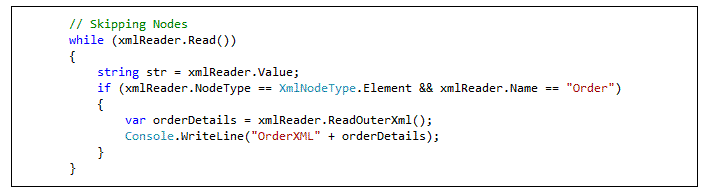
XMLReader.Read() is strange behaviour when I try to parse XML using the XmlReader object. It usually skips the record and move the pointer to next level of element while loop through the elements. The code which I used to find each child records.

This is the sample xml file.


The code which I used to find each child records as detailed below.

When you call ReadOuterXml() method this would consume the complete xml  and point the cursor to just before the next element.

In my example the cursor will pint to element of Order ID=2 record. Hence it never satisfies the condition to fetch Record 2.


Here is the alternate way to find the child records.


You can reach me @ raj.webjunky@Yahoo.com


Friday, 21 June 2013

BizTalk 2013 DynamicPort assign custom Handlers


Hope you might have experience with how ESB Toolkit 2.1 handles the Receive/Send Handlers.  Basically the 2.1 uses the default handler to process the message even though you sophisticatedly defined your own handlers. Microsoft addressed this issue and improved  in 2.2 release and now with 2.2 you have a rich GUI to assign your custom handlers.

This would help you to configure your applications to balance the load and segregate the process also it would  help you to avoid many other issues like memory leakage and Host throttling etc.
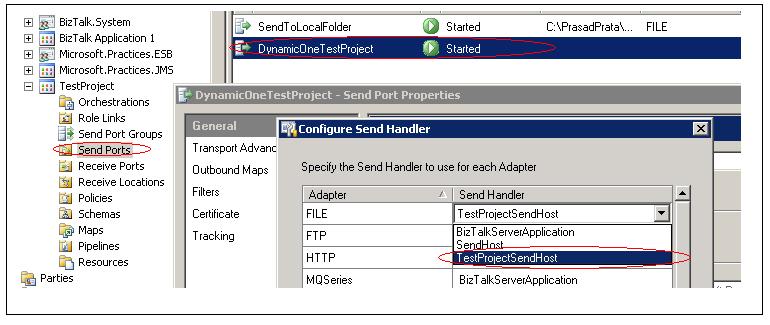
Here I have created a sample Testproject  Hosts ( Receive , Send) and assign them into FILE adapter.

I have created a sample Test Itinerary Project too where I used Static Resolver with FILE adapter to transform he orders to Orders Summary message.  

Itinerary Design


Below screenshot illustrate how many SEND handles been assign for FILE adapter and what was the default adapter out of 3 Send handlers.


Back in ESB Toolkit 2.1 if you had similar configuration  then it leverages with default handler to process the message .  The new ESB Toolkit 2.2 you can define your custom handler.

Hope this would help you for your development.

You can reach me @ raj.webjunky@Yahoo.com

Friday, 5 April 2013

BizTalk BAM Undeploy definitions


Many times I use to forget the BAM Definition file where I saved and struggled to un-deploy the BAM definition without BAM definition file. Hope many of you faced this situation.
Here is easy way of creating definition file even you missed the file.


All you have to do is Create the BAM definition struction as mentioned below.


Run the below query to get Activity and view xml structures which was  already deployed in your server.

Use [BAMPrimaryImport]

SELECT  A.[ActivityName],
A.ViewName,
B.[DefinitionXml] 'ActivityXml', 
C.[DefinitionXml] 'ViewXml' 
FROM
[dbo].[bam_Metadata_ActivityViews] A 
Inner Join [dbo].[bam_Metadata_Activities] B
On A.[ActivityName]= B.[ActivityName]
Inner Join [dbo].[bam_Metadata_Views] C 
On A.ViewName = C.ViewName

Copy the ActivityXMl and ViewXML to the newly created BAM definition xml file.

Now you need execute the undeploy command.

"C:\Program Files (x86)\Microsoft BizTalk Server 2010\Tracking\bm.exe" remove-all -DefinitionFile:"NewDefinitionFile.xml"